 Stephen Sumner
Search Console platform properties: how to actually use them
Your Instagram, TikTok, X and YouTube posts finally have search data attached to them. Here is the method I would hand an in-house team: what to set up, what to read in the first 28 days, and the monthly routine that turns query data into better captions.

Platform properties are now live for everyone. As of 29 July 2026 you can verify your Instagram, TikTok, X and YouTube accounts as Search Console properties and see the clicks, impressions and search queries Google sends to posts you do not host. Google published a companion guide on the same day. This is the method I would run in the first month.
For in-house teams this closes a gap that has been open for years. You had query-level data for your website and follower counts for your social channels, and nothing joining the two. If a Reel earned visibility in Google Search, you found out by accident.
What follows is a working process: setup, what to read in the first 28 days, the two comparisons worth building, and the routine that keeps it useful. About 30 minutes a month once it is running.
What are Search Console platform properties?
A platform property is a Search Console property for a social or video account rather than a website. Google supports Instagram, TikTok, X and YouTube, and reports how your posts perform in Google Search, Discover and Google News. You get three surfaces — Performance, Insights and Achievements — and, for the first time, a Search Console property you can verify without owning a domain.
Google introduced the property type on 7 July 2026 and made it globally available on 29 July, alongside a new guide to analysing social and video performance. Read both. This post is the operating layer on top of them.
Why should an in-house marketing team care?
Because it changes what you can prove. Social teams are usually measured on platform-native engagement, which describes how your followers behaved and says nothing about the people who found you through Google. Platform properties give you the search terms behind that discovery — the same data you would expect for a landing page.
It also changes how you write. Once you can see that a Short is pulling traffic from a phrase nobody on the team would have guessed, the title, the caption and the first line become search decisions rather than tone-of-voice decisions. That is the habit that already drives good on-site content, moved sideways.
Captions stop being copy and start being queries.
Set expectations honestly, though. This is Google's slice of your social reach, not all of it, and for most brands it will be a minority of total views. It earns its place because it is the slice you can act on with words.
How do you set them up?
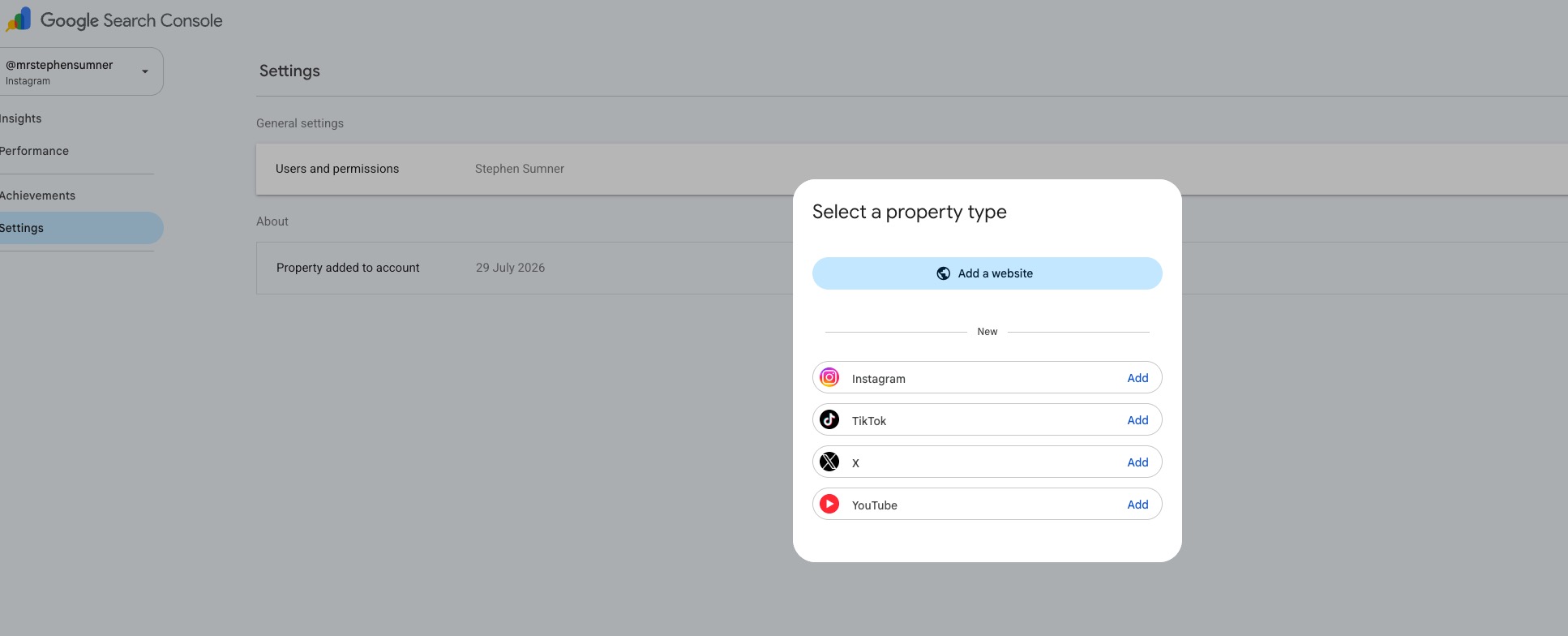
- Check what you already have. Open the property selector before you set anything up. If you have claimed your Search profile, your verified accounts are added to Search Console automatically.
- Add a property per platform. Choose the platform, then follow the on-screen verification through that platform's own sign-in. Each account is added and verified separately.
- Only add accounts you genuinely post to. Dormant channels produce empty reports and make the monthly review longer than it needs to be.
- Record the verification date. Data effectively starts when the property is verified, so note the date. It is the line your later comparisons run from.
- Give the social team access. The people writing captions need to read this, not just whoever owns Search Console.
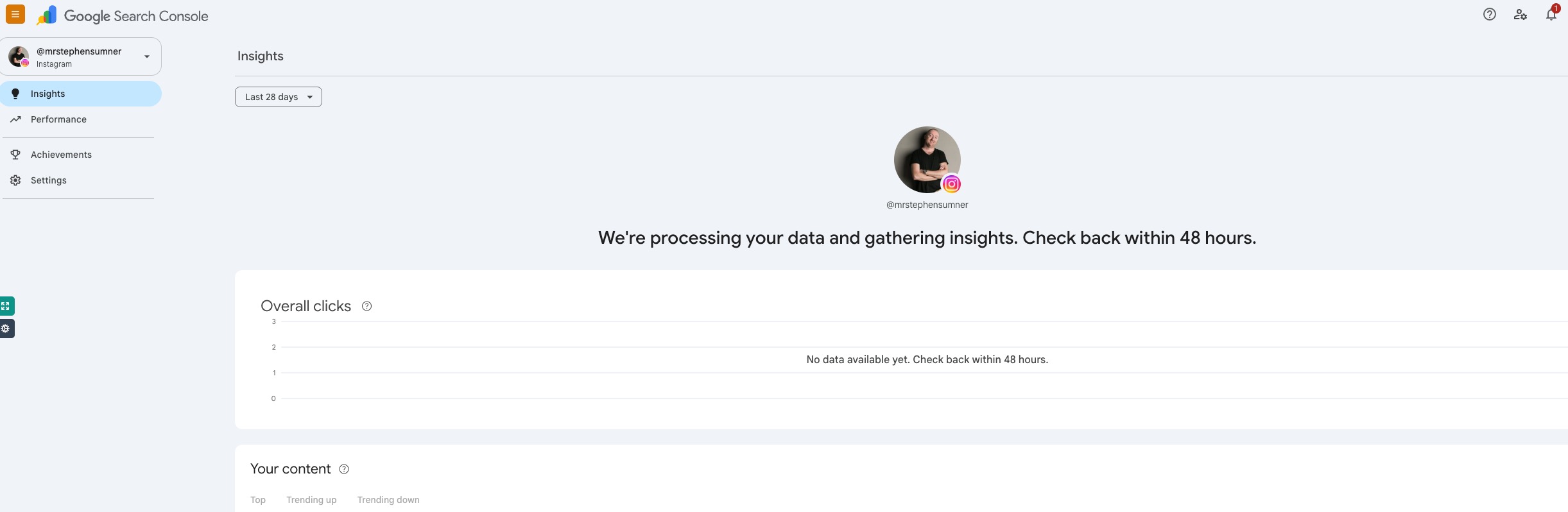
One thing to expect on day one: nothing. Insights tells you it is processing your data and to check back within 48 hours, and the click chart sits empty until it does. That is normal, not a failed setup.
What should you look at first?
Start in the Insights report. It answers four questions in one view: how many clicks you had over the last 28 days and where in Google they came from, which posts or videos brought the most people in, which search terms they used, and which countries they were in. That is enough to brief a month of content on its own.
Then find the query groups card. It clusters the terms sending you traffic into themes, and splits them into top, trending up and trending down. Trending up is next month's content calendar. Trending down is usually a theme you have quietly stopped serving.
If you have just posted something, use the 24-hour filter above the Performance chart. It shows whether a new video is being picked up in Search today — early enough to do something about it, such as cross-posting it or referencing the same trend on another channel while the interest is live.
Which comparisons are worth building?
Two, and both take a couple of minutes with the page filter and comparison mode.
Format against format. On YouTube, compare URLs containing /watch with URLs containing /shorts/. On Instagram, compare /p/ with /reels/. You learn which format Google actually surfaces for your subject matter, which is not always the format your team most enjoys making.
Platform against platform. Filter to a single URL, export, then repeat for each platform property. Where a long-form YouTube tutorial pulls search traffic and the short TikTok cut of the same idea does not, you have a repackaging decision rather than a content one.
One caution on playlists. Filtering YouTube URLs for playlist reports how the playlist page performs, not the videos inside it. That is genuinely useful for judging playlist names and descriptions, and misleading if you read it as video performance.
How do you turn a query into a change?
Pick one post a month. Rewrite its title or caption around the phrasing you can see in the query data, then add a Search Console annotation on the date you changed it. An annotation is simply a bookmark in the data; without one, in six weeks nobody will be able to say whether the lift came from your edit or from something else entirely.
Then watch for spikes on older content. A tutorial from eighteen months ago picking up impressions again is usually a seasonal or cultural trigger, and it is the cheapest content brief you will get: pin it, mention it on your other channels, or film the follow-up while the interest holds.
What this does not do
It does not attribute revenue, it does not cover platforms outside those four, and it is not the same thing as a Search profile — that is a public page for your audience, whereas a platform property is private analytics for you. It also will not fix a channel nobody is searching for. The data tells you which of your existing content Google is already surfacing; it does not create demand that was never there.
Which is the honest framing for the whole feature: it is a measurement upgrade, not a growth channel. The growth comes from what you change once you can see. If your website has the same problem — visible in places you cannot measure — the same discipline applies, and my 120-point AI readiness framework is where I start on the site side.
The monthly routine
Thirty minutes, once a month, per platform property. Copy it into your own tracker.
- Open the Insights report for each platform property and note the 28-day click trend.
- Read the query groups card. Record the three strongest trending-up themes and one trending-down theme.
- Compare formats —
/watchagainst/shorts/, or/p/against/reels/— and note which Google favoured this month. - Check the top five posts by clicks. Are they the posts the team expected?
- Rewrite one title or caption around a real query, and add an annotation on the date you changed it.
- Look for impression spikes on content older than six months, and decide whether to revive it.
- Export the month's queries and send the three most surprising to whoever writes the captions.
That is the whole method. It is deliberately small, because a routine somebody runs every month beats a dashboard nobody opens. If you want the same rigour applied to your website rather than your channels, that is what I do.
Questions people ask about platform properties
Do I need a website to use platform properties?
No. A platform property is verified through the social or video account itself, so it is the first Search Console property you can set up without owning a domain. Brands and creators with no site of their own can use Search Console for the first time.
Which platforms does Search Console support?
Instagram, TikTok, X and YouTube. Each account is added and verified separately, and each gets its own Performance, Insights and Achievements reports.
How is a platform property different from a Search profile?
A Search profile is a public page that gathers your content for your audience. A platform property is private analytics for you. Related idea, two separate tools — and if you have already claimed a Search profile, your verified accounts are added to Search Console automatically.
Does this replace TikTok or YouTube analytics?
No. Platform properties only describe how your posts perform on Google Search, Discover and Google News. That is one discovery channel among several, and usually not the largest. Keep reading your platform-native analytics for everything else.
How far back does the data go?
Treat verification as the start line. Add the accounts you care about now, even if nobody opens the reports for a month, so the history exists when you need it.
Who should own this internally?
Whoever writes the captions, with the SEO lead reading the query data alongside them. The value is in the handover: search terms in, titles and first lines out. If it sits only with the SEO team, nothing on the channel changes.

Your content is visible in places you cannot see yet.
Platform properties close one gap. A full audit closes the rest: what Google can crawl, what AI systems can cite, and which of your pages are eligible for either. Scored, evidenced, and handed over as a plan rather than a PDF.
Request an audit